The One-Click Newsletter · Save • Organize • Retrieve
Your links. Your day. One click.
A bookmark manager plus a personal & team productivity workspace. MyOneClick keeps every site you love on one
gorgeous board you can open from any device — and now runs your whole day, too.
myoneclick.com — your board
∞Unlimited bookmarks, categories & sub-categories
1click to any link you’ve saved — from any device
$0to start — five plans that grow with your team
20most-loved functions, built in and ready to use
Inside this issue
01Your links, one click awayWhy you’ll love it, at a glance
02Bring order to your bookmarksBoards, sample categories & the top 10 functions
03The Today Planner powers upEight new features that run your day
04Built for teams + plansYour company’s knowledge library — from free
Welcome to our very first newsletter! Do you have bookmarks that seem to disappear just when you need them most?
MyOneClick was built to end that — every link saved, organized and found in a single click.
This month the Today Planner grew up: your calls land on Google Calendar and Outlook, every task gets a status, and
anything can move to the board where it belongs.
— The MyOneClick Team
MyOneClickCover story · Issue 01
Cover story
Bring order to your bookmarks
Stop digging through messy browser folders. MyOneClick puts every site you rely on into one organized board —
grouped into colorful categories and sub-categories you control — so the link you need is always one click away.
🗂️
Organized boards
Colorful categories, sub-categories and nested sub-links.
⚡
One-click access
Open any saved site instantly, from anywhere you are.
🔄
Import & export
Bring your browser bookmarks along in seconds.
📱
Any device
Your board follows you on desktop, tablet and phone.
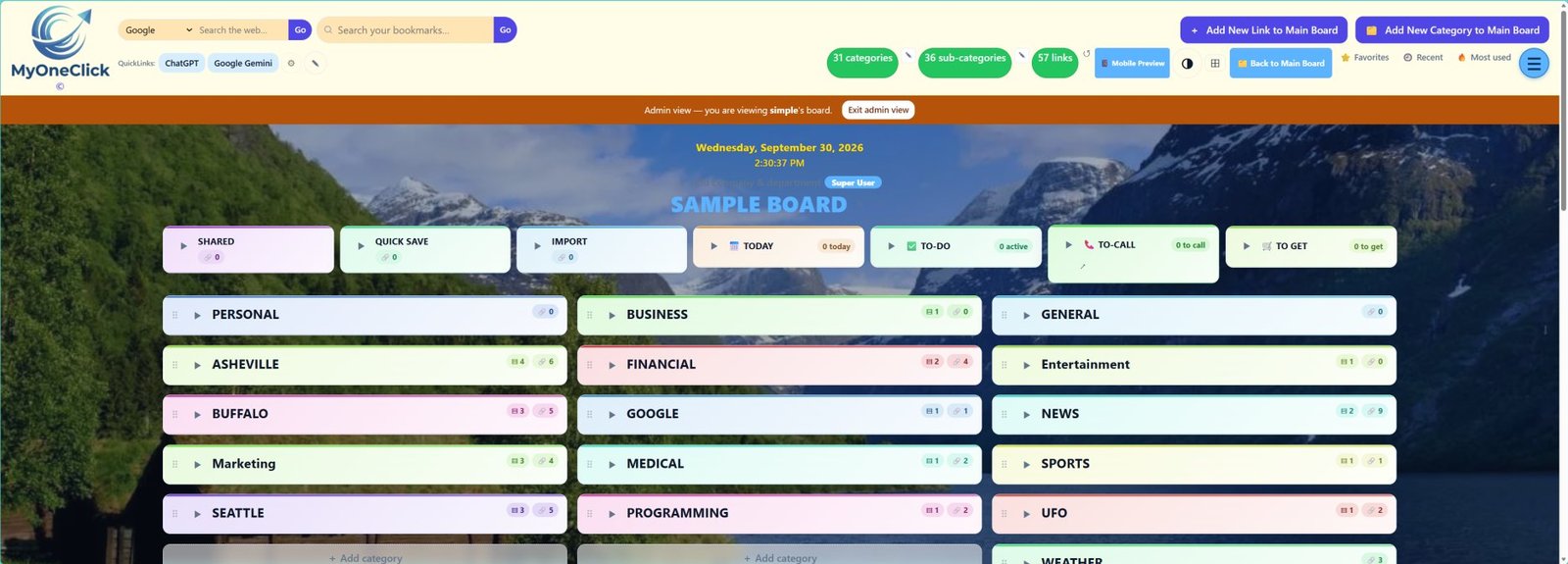
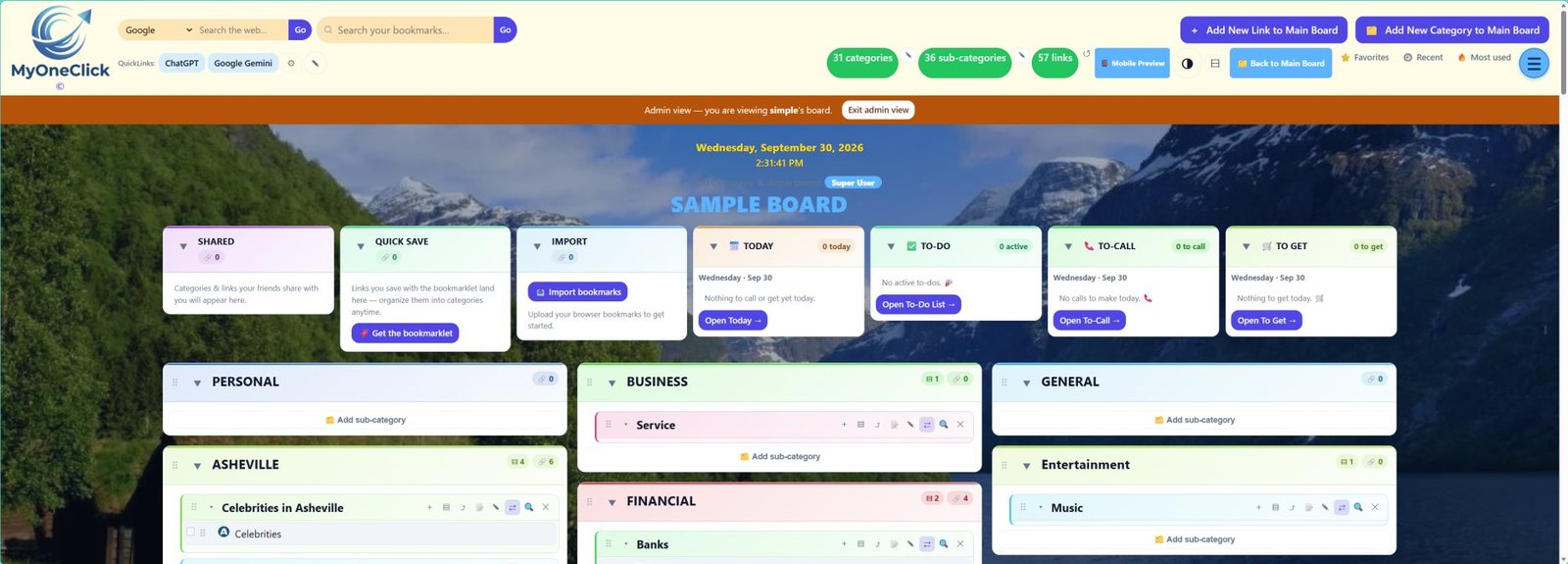
The real thing — categories open, links one click away
🎨 A sample board
Shopping
AmazoneBayEtsyWalmart
Social
FacebookInstagramXLinkedIn
Entertainment
YouTubeNetflixSpotifyHulu
Work
GmailDriveSlackZoom
News
CNNBBCNY TimesReuters
Finance
ChasePayPalMintFidelity
⭐ The top 10 functions users love
1Fast SearchFind any link in secondsExtremely high
2Categories / FoldersKeeps everything organizedExtremely high
3TagsMultiple ways to find linksExtremely high
4Browser ExtensionSave a page with one clickExtremely high
5Cross-Device SyncAccess links anywhereExtremely high
6SharingCollaborate with coworkers or familyVery high
7Notes & DescriptionsRemember why a link was savedVery high
8Import Browser BookmarksEasy migration from browsersVery high
9Favorites / PinningKeep important links at the topHigh
10Drag-and-Drop OrganizationReorganize without editingHigh
What’s new this month
The Today Planner powers up ⚡
Your day at a glance — to-dos, calls to make and things to get, plus your synced Google Calendar and Outlook.
This month it learned eight new tricks.
📞To-Call4
Active (3)Completed (1)Overdue (1)All (4)Open (5)📦 Archive
Call Sam — 555-201-4433Overdue · Oct 3🔔 ⇅
Call Dana — proposal follow-upIn progress🔔 ⇅
Call the print shopWaiting🔔 ⇅
Call Lee — new contractRescheduled🔔 ⇅
Call Ann — confirm lunchDone🔔 ⇅
🕘Daily Schedule✓ 2
All (4)Open (2)✓ Completed (2)
9:00 AMTeam standup✓ Completed
11:00 AMSend the invoice✓ Completed
3:00 PM📞 Call Dana ⧉ also on Google Calendar○ Open
4:30 PMClient review○ Open
⭐
Top Priorities that think
Past due first, then by priority, then due today — with today’s calls on top. Drag ⠿ to put it in your own order.
📅
Calls on your calendar
Give a call a time and it lands on your Google Calendar and Outlook — and moves with it when plans change.
🔔
Notify friends
Pick friends when you add a call, task or item — they get a notice on their Main Board and Top Priorities.
⇅
Move anything, anywhere
Wrote a “call Bob” to-do? Move it to To-Call in two clicks — or up, down and between project boards.
🏷️
A status for everything
Not started · In progress · Waiting · Suspended · Done — and 📅 Re-schedule to a new date in one step.
✓
Completed on the schedule
Tick off any entry — Google and Outlook events too — or ✓ Complete all for the day, with a line through each.
⧉
No more duplicates
The same call twice? Matched by name and phone number, shown once, and cleaned up across Google and Outlook.
📦
Archive & Open views
Put things away without deleting them — and see every open call, from any day, in one list.
💡
Pro tip: on the Today page, use the Active · Completed · Overdue · All tabs on each card to
focus on what matters now — your choice is remembered for next time.
🚀 Get started in 3 steps
1Import your bookmarksBring everything over from your browser in seconds.
2Add the Save bookmarkletSave any page to your board with one click.
3Open your Today pageCalls, to-dos, things to get and your calendar — in one view.
MyOneClickFor teams · Issue 01
Where MyOneClick differentiates
More than bookmarks: your team’s knowledge library
MyOneClick isn’t just a place to save links — it’s an Enterprise Digital Knowledge Library. Give every
department its own library, keep vendor, training and compliance resources in one trusted place, and keep that
knowledge when people move on.
 MyOneClick