 My
MyOrganize it your way
Unlimited categories and sub-categories on every plan — shape the board around how you actually work. Sub-sub-categories and nested sub-links on Super User and above.
Cloud bookmark manager & link library
Bookmarks in one browser, links emailed to yourself, URLs lost in spreadsheets and chats. MyOneClick puts them on one colorful board you can open from any device.
Choosing for a team? Schedule a demo
Sound familiar?
Most people and teams keep the resources they rely on in a dozen places at once. Each one works — until you need something fast.
The hidden cost
No one plans to lose a link. But when resources are spread out, the same small costs repeat every day.
The transformation
How it works
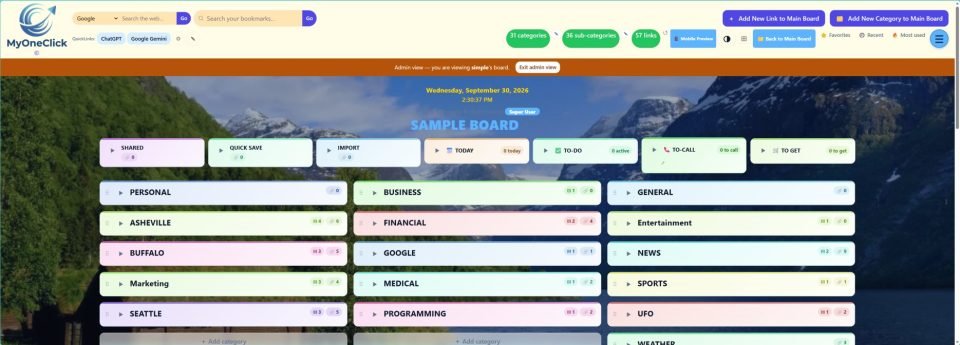
Import the bookmarks you already have, then save new pages from your browser bar with the Save to MyOneClick bookmarklet — or Quick Save them now and file them later.
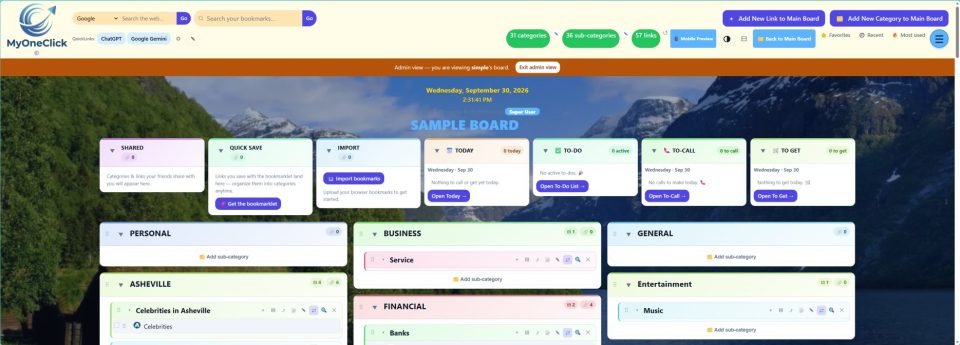
Group links into colorful categories and sub-categories that match how you actually work. Add a note so everyone knows what a link is for.
Search your whole board or a single category, check Favorites, Recent and Most used — and open what you need in one click.
An interactive example with sample links. Type to filter, like search on a real board.
Who it’s for
Replace messy browser folders and emails-to-self with one board you can open anywhere. Plan the day with Today, To-Do, To-Call and To-Get lists on Super User and above.
Best fit: Free to start, Super User for the planning tools.
Start freeCollect your tools, vendor portals, forms and how-tos. With Super User, share categories and links with friends and colleagues, check your board for dead links and show your company name and department on the board.
Best fit: Super User.
Start free, upgrade any timeKeep department links, processes, training and research organized — then manage the work around them. The Manager plan adds Project Management (projects, tasks & assignments), team email, a Journal and online status (Online · Idle · Offline).
Best fit: Manager.
Schedule a demo Or start freeGive departments their own organized libraries for onboarding, training, vendor resources, research and process links — so knowledge stays with the organization, not in one person’s bookmarks. Admin Manager lets you create and manage your own Managers and Users.
Best fit: Admin Manager. Let’s talk about your setup.
Schedule a demoSee the real thing
Watch the video about how MyOneClick began.
What you can do
Unlimited categories and sub-categories on every plan — shape the board around how you actually work. Sub-sub-categories and nested sub-links on Super User and above.
Search the whole board or inside a single category. Jump straight to your Favorites, Recent and Most used links.
Two bookmarklets, no extension to install: Save to MyOneClick to file a page right away, or Quick Save to sort it later.
Add notes to links, categories and sub-categories so the context travels with the link.
On paid plans, drag & drop or use Move to put any link, sub-category or category exactly where it belongs.
Today planner, To-Do, To-Call and To-Get lists live beside your links on Super User and above.
The dead-link checker (Super User and above) helps you find links that no longer work.
Light or dark display on every plan, plus a custom background and accent color on paid plans — a board you’ll enjoy opening.
Your path with MyOneClick
Six simple stages — and you can go from the first to the fourth in a few minutes, for free.
Your important links are spread across a dozen places.
One colorful board for every link — open it from any device.
No payment details. Unlimited bookmarks & categories, plus import.
Simple pricing
Every plan includes unlimited bookmarks, categories and sub-categories, both bookmarklets, and import & export.
$0
Get organized on your own
$10/mo
Everything in Free, plus
Most complete for individuals
$15/mo
Everything in User, plus
$25/mo
Everything in Super User, plus
$100/mo
Everything in Manager, plus
Prices in USD as listed on Plans & Pricing, which always has the current, complete plan details.
Questions
Browser bookmarks stay inside one browser and turn into long folder lists. MyOneClick puts your links on one visual board — categories, sub-categories and notes — that you open from any device and search in seconds. You can import your existing browser bookmarks to start.
Spreadsheets and chat threads store links, but they’re slow to scan and easy to lose. MyOneClick is built for links: each one opens in one click, sits in a named category, can carry a note explaining what it is, and is found with search.
No. Individuals can start on the Free plan. Super User adds sharing with friends; Manager adds Project Management and team email; Admin Manager lets you create and manage your own Managers and Users.
Yes. Every plan, including Free, includes Import bookmarks and Export bookmarks.
Register for the Free plan with a few details — name, username, email and a password. No payment details are needed. Then import your browser bookmarks or save pages with the Save to MyOneClick and Quick Save bookmarklets.
Yes. The Free plan includes unlimited bookmarks, categories and sub-categories. You can upgrade to a paid plan from your account page when you need more.
Yes. MyOneClick runs in your web browser, so your board opens on desktop, tablet and phone.
Tell us about your team on the Contact page and we’ll arrange a demo and help you choose between the Manager and Admin Manager plans.
Create your free account and bring your links together today.